Posted on October 30, 2024 by Michelle Hoover -
Battery, electronics, lighting and tire collection sites must be operated during regular business hours throughout the calendar year.
Household hazardous waste collection sites may open seasonally. The Where to Recycle map should reflect the time of the year when the collection site operates.
Note: In October 2026, the Where to Recycle map moved from rpra.ca to OntarioRecycles.ca, RPRA’s website to keep the public informed about the circular economy and recycling in Ontario.
Posted on October 30, 2024 by Michelle Hoover -
To update the type of collection site, submit a request through the Where to Recycle map directly by:
- looking up the location,
- clicking the location,
- clicking the ‘Report an issue for this location’ link, and
- filling out the form by providing the correct collection site type.
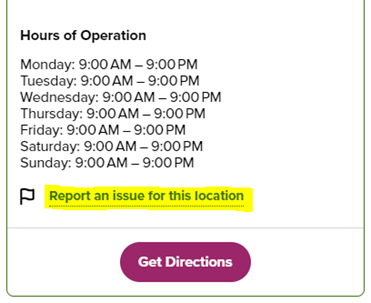
If the request is for multiple locations, contact the Compliance Team at [email protected] with the following information:
- the issue,
- name and address for each collection site, and
- your contact information.
Note: In October 2026, the Where to Recycle map moved from rpra.ca to OntarioRecycles.ca, RPRA’s website to keep the public informed about the circular economy and recycling in Ontario.
Posted on October 30, 2024 by Michelle Hoover -
To delete a duplicate collection site, submit a request through the Where to Recycle map directly by:
- looking up the location,
- clicking the location,
- clicking the ‘Report an issue for this location’ link, and
- filling out the form by asking to remove the duplicate collection site.
If the request is for multiple locations, contact the Compliance Team at [email protected] with the following information:
- the issue,
- name and address for each collection site, and
- your contact information.
Note: In October 2026, the Where to Recycle map moved from rpra.ca to OntarioRecycles.ca, RPRA’s website to keep the public informed about the circular economy and recycling in Ontario.
Posted on October 30, 2024 by Michelle Hoover -
Municipalities are required to accept materials from the sectors identified in their Environmental Compliance Approval (ECA). Municipalities are not required to accept more than what their ECA requires them to.
Posted on October 30, 2024 by Michelle Hoover -
If your collection site isn’t part of a PRO’s collection network, it won’t appear on the Where to Recycle map. The map populates collection sites with data entered by producers or PROs on their behalf.
If you are working with a PRO and your site is not listed on the map, contact your PRO.
If you aren’t already working with a PRO and want to add your collection site to the map, you can find a list of PROs and their contact information on the applicable program page of RPRA’s website.
Note: In October 2026, the Where to Recycle map moved from rpra.ca to OntarioRecycles.ca, RPRA’s website to keep the public informed about the circular economy and recycling in Ontario.
Posted on October 30, 2024 by Michelle Hoover -
A public collection site must be readily accessible to the public and accept designated used materials during regular business hours. Publicly accessible collection sites and events appear on the Where to Recycle map. Note: In October 2026, the Where to Recycle map moved from rpra.ca to OntarioRecycles.ca, RPRA’s website to keep the public informed about the circular economy and recycling in Ontario.
A private collection site (e.g. office or school that collects designated materials) does not need to be publicly accessible. Private collection sites do not appear on the map.
Read this related FAQ: What does it mean for a collection site to be readily accessible to the public?
Posted on October 30, 2024 by Michelle Hoover -
First, contact your PRO to confirm if the collection site should be considered private or if it can be removed entirely from their collection system. If they confirm it can be removed from the system, ask them to deactivate it so it no longer appears on the map.
If you aren’t working with a PRO, request to remove your collection site through the Where to Recycle map directly by:
- looking up the location,
- clicking the location,
- clicking the ‘Report an issue for this location’ link, and
- filling out the form asking to remove the collection site.
Note: In October 2026, the Where to Recycle map moved from rpra.ca to OntarioRecycles.ca, RPRA’s website to keep the public informed about the circular economy and recycling in Ontario.
Posted on October 30, 2024 by Michelle Hoover -
Wrong materials showing
If your site doesn’t collect the material(s) listed on the map, you can submit a request to change it through the map directly by:
- looking up the location,
- clicking the location,
- clicking the ‘Report an issue for this location’ link, and
- filling out the form by providing which materials should be removed.
Materials not showing
If you collect more materials than what is listed on the map, contact your PRO and they’ll update your collection site information.
If you aren’t already working with a PRO for a specific material and want to add a material to your collection site, you can find a list of PROs and contact information on the applicable program page of RPRA’s website.
Note: In October 2026, the Where to Recycle map moved from rpra.ca to OntarioRecycles.ca, RPRA’s website to keep the public informed about the circular economy and recycling in Ontario.
Posted on October 30, 2024 by Michelle Hoover -
Websites are taken from Google Maps. If the information on Google Maps is incorrect, update your Google account information by following these steps. Note: there may be a delay between the time you update your information in Google and it showing on RPRA’s map.
If the information on Google Maps is correct and not showing on the Where to Recycle map, request to change it through the map directly by:
- looking up the location,
- clicking the location,
- clicking the ‘Report an issue for this location’ link, and
- filling out the form by providing the correct website link.
Note: In October 2026, the Where to Recycle map moved from rpra.ca to OntarioRecycles.ca, RPRA’s website to keep the public informed about the circular economy and recycling in Ontario.
Posted on October 30, 2024 by Michelle Hoover -
Phone numbers are taken from Google Maps. If the information on Google Maps is incorrect, update your Google account information by following these steps. Note: there may be a delay between the time you update your information in Google and it showing on RPRA’s map.
If the information on Google Maps is correct and not showing on the Where to Recycle map, request to change it through the map directly by:
- looking up the location,
- clicking the location,
- clicking the ‘Report an issue for this location’ link, and
- filling out the form by providing the correct phone number.
Note: In October 2026, the Where to Recycle map moved from rpra.ca to OntarioRecycles.ca, RPRA’s website to keep the public informed about the circular economy and recycling in Ontario.
Posted on October 30, 2024 by Michelle Hoover -
Business hours are taken from Google Maps. If the information on Google Maps is incorrect, update your Google account information by following these steps. Note: there may be a delay between the time you update your information in Google and it showing on RPRA’s map.
If the information on Google Maps is correct and not showing on the Where to Recycle map, request to change it through the map directly by:
- looking up the location,
- clicking the location,
- clicking the ‘Report an issue for this location’ link, and
- filling out the form by providing the correct business hours.
Note: In October 2026, the Where to Recycle map moved from rpra.ca to OntarioRecycles.ca, RPRA’s website to keep the public informed about the circular economy and recycling in Ontario.
Posted on October 30, 2024 by Michelle Hoover -
Only your PRO can update collection site addresses. Ask your PRO to remove the old address from their collection network and add the new address.
The Compliance Team is unable to make changes to the address of a site that has been reported.
Note: In October 2026, the Where to Recycle map moved from rpra.ca to OntarioRecycles.ca, RPRA’s website to keep the public informed about the circular economy and recycling in Ontario.
Posted on October 30, 2024 by Michelle Hoover -
Collection site names are taken from Google Maps. If the name is wrong, request to change it through the map directly by:
- looking up the location,
- clicking the location,
- clicking the ‘Report an issue for this location’ link, and
- filling out the form by providing the correct name.
Note: In October 2026, the Where to Recycle map moved from rpra.ca to OntarioRecycles.ca, RPRA’s website to keep the public informed about the circular economy and recycling in Ontario.


