




Frequently Asked Questions
Results (113)
Click the question to read the answer.
-
A person is considered a lighting producer under the Electrical and Electronic Equipment (EEE) Regulation if they supply lighting into Ontario and one of the following apply:
- Are the brand holder for the lighting and have residency in Canada;
- If there is no resident brand holder, have residency in Ontario and import lighting from outside of Ontario;
- If there is no resident importer, have residency in Ontario and market directly to consumers in Ontario (e.g. online sales); or
- If there is no resident marketer, do not have residency in Ontario and market directly to consumers in Ontario (e.g., online sales).
Even if you do not meet the above definition, there may be circumstances where you qualify as a producer. Read the Electrical and Electronic Equipment Regulation for more detail or contact the Compliance and Registry Team for guidance at [email protected] or (647) 496-0530 or toll-free at (833) 600-0530.
See our FAQ to understand “What is lighting under the EEE Regulation?”, “Who is a brand holder?”
-
Lighting producers are required to establish and operate a lighting collection system that meets the accessibility requirements in the EEE Regulation. A producer must ensure that all lighting collected is managed regardless of what their minimum management requirements is.
A producer has the choice of establishing and operating their own collection and management systems or working with one or more producer responsibility organizations (PROs) registered with RPRA to meet their obligations.
For detailed information on lighting producer requirements, visit our Lighting Producer webpage.
If you have further questions about lighting producer requirements, contact the Compliance and Registry Team at [email protected] or 1-833-600-0530.
-
A lighting producer qualifies for an exemption if their average weight of supply for that calendar year is less than or equal to 700 kg.
Average supply weight is determined using the following formula:
Average weight of lighting supply = (Y3 + Y4 + Y5) / 3
Eg. 2025 average weight of supply = (2022 + 2021 + 2020) / 3
Lighting producers that meet the exemption criteria are exempt from:
- Registering with and reporting to RPRA
- Establishing a collection and management system
- Meeting a management requirement
- Promotion and education requirements
Producers must verify that they continue to meet the exemption annually, since their average weight of supply will change from year to year.
Producers that are exempt must keep records of the materials they supplied, as set out in section 30 of the regulation.
Producers are advised to confirm their exemption with the Compliance Team at 833-600-0530 or [email protected].
See our FAQs: “How are lighting producers’ minimum management requirements determined?” and “What do I have to do if I am an exempt lighting producer?”
-
Producers are not required to collect and manage their own branded products and materials. Instead, a producer is expected to collect and manage a portion of similar materials in Ontario. The portion of material that a producer collects and manages is known as their minimum management requirement. A minimum management requirement, which is set based on calculations outlined in the applicable Regulation, is the weight of the products or packaging that the producer must ensure is collected and managed. The calculated amount is proportionate to the weight of materials that producer supplied into the province.
For example, a producer who supplied laptops into Ontario does not need to collect and manage their own branded laptops. Instead, they must ensure that they collect and manage an equivalent weight of information technology, telecommunications, and audio-visual equipment (ITT/AV) materials.
Similarly, a producer who supplied cardboard boxes into Ontario does not need to collect and manage those exact cardboard boxes. Rather, they need to ensure that an equivalent weight of paper is collected and managed.
Almost all producers will work with producer responsibility organizations (PROs) for the purposes of meeting their obligations to collect and manage materials. PROs establish collection and management systems across Ontario for different material types. A producer can meet their obligations to collect and manage materials by entering into a contract with a PRO to provide these services on their behalf.
-
For the purposes of lighting supply data verification:
- “Large lighting producer” means a lighting producer with a three-year rolling average supply weight in respect of a calendar year that is equal to or more than 90,000 kilograms.
-
- Example: for the 2026 supply data report, the three-year rolling average supply weight is calculated as: (weight supplied in 2023 + weight supplied in 2022 + weight supplied in 2021)/3
Only large producers are required to submit a supply data verification report. While small producers are not required to submit a verification report, they are still subject to inspections. Review the EEE Verification and Audit Procedure for more information.
If you are unsure if your company meets the definition of a large producer, contact RPRA’s Compliance and Registry Team at [email protected] or 833-600-0530.
-
Yes, a producer, a PRO (producer responsibility organization) on behalf of a producer, or a service provider on behalf of either party, can collect any product or material (including materials or products that are not designated under the Resource Recovery and Circular Economy Act, 2016 (RRCEA)). For example, a battery producer may choose to collect batteries that weigh over 5kg; a tire producer may choose to collect bicycle tires; or a Blue Box producer may choose to collect books.
Products or materials that are not designated under RRCEA regulations cannot be counted towards meeting a producer’s collection or management requirements under RRCEA.
If designated materials are co-collected with materials that are not designated, a person must use a methodology or process acceptable to the Authority to account for those materials. Anyone considering this can contact the Compliance Team to discuss at [email protected] or 833-600-0530.
For example, if bicycle tires are collected at the same time as automotive tires, they must be accounted for separately both when collected and when sent to a processor.
-
A producer’s individual minimum management requirement is determined by the following formulas, found in section 14 of the Electrical and Electronic Equipment (EEE) Regulation, summarized in the following chart:
Performance Year Supply Report Year Formula 2025 2024 (2020 supply + 2021 supply + 2022 supply) / 3×30% 2026 2025 (2021 supply + 2022 supply + 2023 supply) / 3×30% 2027 2026 (2022 supply + 2023 supply + 2024 supply) / 3×30% 2028 2027 (2023 supply + 2024 supply + 2025 supply) / 3×30% 2029 2028 (2024 supply + 2025 supply + 2026 supply)/ 3×30% 2030 2029 (2025 supply + 2026 supply + 2027 supply)/ 3×30% 2031 2030 (2026 supply + 2027 supply + 2028 supply)/ 3×35% It is important to note that producers must ensure that all lighting that is collected is managed, regardless of their minimum management requirement.
Note: Producers with a management requirement below a certain threshold may be exempt from registering with and reporting to RPRA. See our FAQ ‘How do I determine if I am an exempt lighting producer?’ to learn more.
-
A producer responsibility organization (PRO) is a person retained by a producer to provide collection, management and administrative services to help producers meet their regulatory obligations.
A prospective PRO is a person that has registered with RPRA but have not been identified by a producer in RPRA’s registry to carry out regulatory responsibilities.
More information on PROs
PRO responsibilities include:
- Arranging for the establishment or operation of collection or management systems
- Establishing or operating a collection or management system
- Preparing and submitting reports
In addition, under the Hazardous and Special Products regulation, a PRO includes a person retained by a producer for the purpose of:
- Implementing a promotion and education program
Only PROs that meet this definition will:
- Be listed on RPRA’s website as a PRO
- Be invited to attend all-PRO meetings with RPRA
- Receive system-wide compliance communications
More information on prospective PRO
RPRA will list all prospective PROs on its website for up to one year. After that period, prospective PROs that remain unassigned by a producer in the registry will be notified, removed from the website, and have their registry account deactivated.
RPRA will publish a list of producers who have not yet identified a PRO in the registry. This will help prospective PROs understand where opportunities may exist.
-
No, where a producer is exempt, the regulatory obligations do not become the responsibility of the organization that is next in the producer hierarchy. The exempt producer remains the “producer” for those materials; they are just exempt from certain requirements under the regulation as set out in the relevant provisions providing for the exemption. This is the case in all RRCEA regulations.
-
Free riders are obligated parties that:
- Have not registered or reported to RPRA
- Have not established a collection and management system (if they are so required to), or;
- Are not operating a collection and management system (if they are so required to).
See our FAQs to understand “What is RPRA’s approach to free riders?”, and “What do I do if I think a business is a free rider?”
To note:
- Some producers only have requirements to register and report. Please refer to your specific program page on our website to understand producer obligations.
- Collection and management systems may be accomplished by a producer responsibility organization (PRO) on behalf of a producer through contractual arrangements between the producer and PRO. If a PRO is managing a producer’s collection and management requirements, producers must identify that PRO to RPRA.
-
Producers are obligated parties under the Resource Recovery and Circular Economy Act and are ultimately responsible for their data submitted through RPRA’s Registry. Producers can choose to contract with an external consultant to support their data submission, but third parties have limited permissions in the Registry as they are not regulated parties.
A producer can choose to assign a primary or secondary user profile in their Registry account to an external consultant. An external consultant may submit supply data reports and/or pay registry fees on the producer’s behalf.
External consultants cannot submit and/or sign registration, executive attestations, account admin changes or supply data adjustment documentation on behalf of a producer. External consultants cannot be account admins, nor can they manage a PRO within the Registry on behalf of a producer.
-
An exempt producer is not required to:
- Register and report to RPRA
- Establish a collection and management system
- Meet a management requirement
- Meet promotion and education requirements
Exempt producers must retain records related to the weight of lighting supplied into Ontario each year and provide them to RPRA upon request.
See our FAQ: ‘How do I determine if I am an exempt lighting producer?’
-
Lighting is defined as electrical and electronic equipment (EEE) that has the primary purpose of producing light.
Note, the below lists are non-exhaustive.
Lighting does not include:
- lighting that is provided with another product or a fixture, or
- lighting that also falls into the category of ITT/AV.
Examples of included lighting under the EEE Regulation:
- Bulbs
- Dimmable light bulb
- Fluorescent bulb
- Halogen bulb
- Headlight bulb
- High intensity discharge (HID) lamp
- Indicator Lights
- Incandescent bulb
- Lamp
- Light emitting diode (LED) bulb
- Mini and miniature bulbs
- Motion activated bulb
- Replacement bulbs & lamps
- Tube light
- UV Lamps
- Wi-Fi light bulb
Examples of excluded lighting under the EEE Regulation:
- Ceiling light
- Chandelier
- Flashlights
- Floor lamp
- Flush mount light
- Light bulb supplied with a fixture
- Light bulb supplied with a product
- Light Strips
- Pendant light
- Recessed lighting
- Ring lights
- Sconce
- String lights
- Table & floor lamps
-
Individual Producer Responsibility (IPR) means that producers are responsible and accountable for collecting and managing their products and packaging after consumers have finished using them.
For programs under the Resource Recovery and Circular Economy Act, 2016 (RRCEA), producers are directly responsible and accountable for meeting mandatory collection and recycling requirements for end of life products. With IPR, producers have choice in how they meet their requirements. They can collect and recycle the products themselves, or contract with producer responsibility organizations (PROs) to help them meet their requirements.
-
A producer responsibility organization (PRO) is a person retained by a producer for the purpose of carrying out one or more of the following producer regulatory responsibilities:
- Arranging for the establishment or operation of collection or management systems
- Establishing or operating a collection or management system
- Preparing and submitting reports
In addition, under the Hazardous and Special Products regulation, a PRO includes a person retained by a producer for the purpose of:
- Implementing a promotion and education program
PROs operate in a competitive market, and producers can choose the PRO (or PROs) they want to work with. The terms and conditions of each contract with a PRO may vary.
How do I find a PRO?
Here are the lists of registered PROs:
These lists will continue to be updated as new PROs register with RPRA.
See our FAQ What is the difference between a PRO and a prospective PRO?
-
Lighting producers report supply data in kilograms from two years prior (i.e., 2023 supply data is reported in 2025) in their annual supply report.
Producers can use the actual weight of the obligated lighting, or RPRA’s weight conversion factors found in the EEE Verification and Audit Procedure.
For further questions, contact the Compliance Team at [email protected] or 1-833-600-0530.
-
In determining whether an obligated producer used best efforts to meet their management requirements, the Compliance Team will consider whether the producer, acting in good faith, took all reasonable steps to meet the requirements outlined in the applicable regulation.
For example, best efforts in the context of management requirements may involve a producer regularly monitoring the volume of material being collected and managed, and implementing plans for increasing those volumes if the requirements are unlikely to be met.
Producers can contact the Compliance Team to ask specific questions about fulfilling their obligations.
-
No, only producers are required to pay RPRA program fees. The decision to make producers pay fees and cover RPRA’s costs was made to reflect the fact that the Resource Recovery and Circular Economy Act, 2016 (RRCEA) is based on a producer responsibility framework. Although producers may hire service providers to help meet their obligations, the responsibility remains with the producer.
-
No, the fee holiday only applies to electronics (i.e. information technology, telecommunications and audio-visual (ITT/AV) equipment) producers.
The fee holiday is funded through the $17.5 million in residual funds transferred to RPRA from the legacy recycling program for electronics. You can learn more about the transfer of funds here.
See FAQ: I’m an electronics producer. What is a fee holiday and why do I have one?
-
A producer can grant access to anyone they would like to authorize in their reporting (i.e. Registry) portal. Producer reporting must be done in the producer account and batch data transfers are not accepted.
-
No. RPRA does not administer contracts or provide incentives. Under the Regulations, producers will either work with a producer responsibility organization (PRO) or work directly with collection sites, haulers, refurbisher’s and/or processors to meet their collection and management requirements. Any reimbursement for services provided towards meeting a producers’ collection and management requirements will be determined through commercial contracts.
To discuss any payment, contact your service provider or a PRO. RPRA does not set the terms of the contractual arrangements between PROs and producers.
-
Yes. PROs are private enterprises and charge for their services to producers.
Each commercial contract a producer enters with a PRO will have its own set of terms and conditions. It is up to the PRO and producer to determine the terms of their contractual agreement, including fees and payment schedule.
RPRA does not set the terms of the contractual arrangements between PROs and producers.
-
Each year, large lighting producers are required to submit a supply data verification report in accordance with the EEE Verification and Audit Procedure. Small producers are not required to submit a verification report but will be subject to inspections.
See our FAQ: For annual supply reporting verification, how do I know if I am a small or large Iighting producer?
-
- A lighting hauler is a person that arranges the transport of lighting used in Ontario that are destined for processing, reuse, refurbishing or disposal.
- A lighting processor is a person that processes lighting used in Ontario for the purpose of resource recovery.
-
A brand supply list is a list of brands of obligated products that a producer supplies to consumers in Ontario. A producer must provide a brand supply list that makes up their supply data annually to RPRA. Each program has different requirements regarding how a producer must submit a brand supply list. For more information, consult the applicable programs’ walkthrough guide or contact RPRA’s Compliance and Registry Team at 1-833-600-0530 or by emailing [email protected].
-
Yes. If you are a producer with retailers or distributors supplying your obligated EEE into Ontario, you can email us at [email protected] to discuss options on how to report your supply data. There are several options available, including an easy-to-use sales formula and weight conversion factors. See the EEE Verification and Audit procedure for more information.
One option is to have your supply data reported by each of your retailers or distributors on a piecemeal basis. The piecemeal option requires that extra steps be undertaken by you and RPRA. You must contact RPRA in advance if you wish to pursue this option.
Note that even if you have a retailer or distributor providing data on your behalf, it remains the producer’s obligation to ensure that all the required data gets reported and that it is reported accurately to RPRA in accordance with the EEE Regulation. The entry of inaccurate information by someone on your behalf is not a defense to non-compliance.
-
No. Producers and PROs working on their behalf must operate the collection and management systems they have established as required by the Regulation even after their minimum management requirements are met.
-
Under the Resource Recovery and Circular Economy Act, RPRA is required to provide an annual report to the Minister that includes information on aggregate producer performance, and a summary of compliance and enforcement activities. Under section 51 of the Act, the Registrar also is required to post every order issued on the Registry.
-
If a producer misreports their supply data to RPRA, they must contact the Compliance Team immediately by emailing [email protected]. Please include the following information in the email:
- The rationale for the change in the data
- Any data that supports the need for a correction (e.g., sales documents, audit)
- Any other information to support the change
While it is an offence to submit false or misleading information under the RRCEA, RPRA wants this corrected as quickly as possible to ensure a producer’s minimum management requirement is calculated using accurate supply data.
RPRA can only receive these requests from the primary contact on the company’s Registry account. Your request for an adjustment will be reviewed by a Compliance and Registry Officer.
-
No, First Nation communities are not required to sign agreements with a PRO or PROs to have materials picked up.
Producers, or PROs on their behalf, are required to provide call-in collection services to pick up tires, electronics, lighting, batteries, and household hazardous and special products free of charge.
For details about minimum amounts required for pickup, timelines for pickup for communities both north and south of the Far North boundary, and contact information for PROs that offer call-in collection, visit our Recycling in First Nation Communities webpage.
-
RPRA does not vet PROs before listing them on the website. Any business that registers as a PRO will be listed. Producers should do their own due diligence when determining which PRO to work with.
-
A brand is any mark, word, name, symbol, design, device or graphical element, or a combination thereof, including a registered or unregistered trademark, which identifies a product and distinguishes it from other products.
A brand holder is a person who owns or licenses a brand or otherwise has rights to market a product under the brand.
Note:
- If there are two or more brand holders, the producer most directly connected to the production of the material is the brand holder.
- If more than one material produced by different brand holders are marketed as a single package, the producer who is more directly connected to the primary product in the package is the brand holder.
-
Brand holders and producers that supply products and packaging are required by legislation to meet individual mandatory collection and resource recovery requirements and may face compliance and enforcement consequences for failing to do so. The executive attestation ensures that executives responsible for managing the brand holder’s or producer’s business are aware of these requirements and can ensure that appropriate measures are put in place to achieve compliance with the regulations.
-
RPRA recognizes the commercially sensitive nature of the information that parties submit to the registry. RPRA is committed to protecting the commercially sensitive information and personal information it receives or creates in the course of conducting its regulatory functions. In recognition of this commitment, RPRA, in addition to the regulatory requirements of confidentiality set out in the Resource Recovery and Circular Economy Act 2016 (section 57), has created an Access and Privacy Code that applies to its day-to-day operations, including the regulatory functions that it carries out.
Obligated material supply, collection, and resource recovery data will only be made public in aggregate form, to protect the confidentiality of commercially sensitive information.
RPRA will publish the names and contact information of all registered businesses – producers, service providers (collectors, haulers, processors, etc.), and producer responsibility organizations. The public will also have access to a list or method to locate any obligated material collection sites, as this information becomes available.
As part of its regulatory mandate, the Registrar will provide information to the public related to compliance and enforcement activities that have been undertaken.
The information that is submitted to the Registry will be used by the Registrar to confirm compliance and to track overall collection and management system performance. It will also be used by RPRA to update its policies and procedures and by the Ministry of Environment, Conservation and Parks for policy development.
-
Collection sites for batteries, electronics, household hazardous waste, lighting, and tires that are reported by producers, or PROs on their behalf, appear on the map.
Collection sites that are considered private (e.g. a recycling bin inside a business that is not accessible to the public) do not appear on the map.
Note: In October 2026, the Where to Recycle map moved from rpra.ca to OntarioRecycles.ca, RPRA’s website to keep the public informed about the circular economy and recycling in Ontario.
-
Registry Resources such as Registry Procedures, Compliance Bulletins, and Reporting Guides can be found on our Lighting Registry Resources webpage.
-
If a producer or service provider needs to adjust the performance data reported to RPRA, they must contact the Compliance and Registry Team immediately by emailing [email protected]. Please include the following information in the email:
- The rationale for the change in the data
- Any data that supports the need for a correction (e.g., tonnage purchase or sale contract, audit)
- Any other information to support the change
While it is an offence to submit false or misleading information under the RRCEA, RPRA wants this corrected as quickly as possible to ensure that it has accurate performance data from all registrants.
RPRA can only receive these requests from the primary contact on the company’s Registry account. Your request for an adjustment will be reviewed by the Compliance and Registry team.
-
Being selected as a subject of an inspection does not automatically mean a producer is out of compliance. While selection relies on RPRA’s risk-based framework, the first step of the process is an initial assessment, not a formal inspection or audit.
However, subsequent verification and audit activities may be undertaken by RPRA to determine whether enforcement action will be taken.
-
Program fees are charges that producers obligated under the Resource Recovery and Circular Economy Act, 2016, are required to pay to RPRA annually to recover its operational costs, including costs related to building and operating the registry, providing services to registrants, and compliance and enforcement activities.
All current and past fee schedules can be found here.
-
Consumer protection laws in Ontario prohibit the misrepresentation of charges, which means that producers or retailers cannot misrepresent any visible fees as a regulatory charge, tax, RPRA fee or something similar.
-
If your collection site isn’t part of a PRO’s collection network, it won’t appear on the Where to Recycle map. The map populates collection sites with data entered by producers or PROs on their behalf.
If you are working with a PRO and your site is not listed on the map, contact your PRO.
If you aren’t already working with a PRO and want to add your collection site to the map, you can find a list of PROs and their contact information on the applicable program page of RPRA’s website.
Note: In October 2026, the Where to Recycle map moved from rpra.ca to OntarioRecycles.ca, RPRA’s website to keep the public informed about the circular economy and recycling in Ontario.
-
RPRA’s Where to Recycle map displays locations across Ontario where the public can drop off used materials to be recycled, such as batteries, electronics, household hazardous waste (e.g., paint, antifreeze, pesticides), lighting and tires, for free. Materials collected at these locations are reused, refurbished, recycled, or properly disposed of to help keep them out of landfill, recover valuable resources and protect our environment.
Note: In October 2026, the Where to Recycle map moved from rpra.ca to OntarioRecycles.ca, RPRA’s website to keep the public informed about the circular economy and recycling in Ontario.
-
Yes. Producers and service providers can enter into contractual agreements with multiple PROs.
-
RPRA collects 13% Harmonized Sales Tax (HST) on applicable fees. This requirement is based on a ruling received from the Canada Revenue Agency (CRA), which determined that HST must be charged on fees collected under the Resource Recovery and Circular Economy Act, 2016 (RRCEA).
HST applies to all RRCEA producer responsibility programs, as well as the Excess Soil and Hazardous Waste programs.
Invoices issued before January 1, 2023, were amended to reflect HST. Registrants can access amended invoices in their Registry accounts under the Invoices tab, where the HST amount and the amended invoice date are shown.
Important notes:
- On the amended invoices there have been no changes to the Invoice Total and registrants will not be required to pay any additional monies to RPRA for past invoices.
- Registrants may be able to claim input tax credits for the HST collected on RPRA fees, for both the amended invoices and new invoices issued January 1, 2023, onwards. However, RPRA is not in a position to provide tax advice and suggests you consult your internal or external accountants to seek their counsel.
- All new invoices issued effective January 1, 2023, will contain appropriate information identifying the amount of the HST and other relevant details. These invoices will also be displayed under the “Invoices” tab in a registrants’ Registry account.
-
Battery, electronics, lighting and tire collection sites must be operated during regular business hours throughout the calendar year.
Household hazardous waste collection sites may open seasonally. The Where to Recycle map should reflect the time of the year when the collection site operates.
Note: In October 2026, the Where to Recycle map moved from rpra.ca to OntarioRecycles.ca, RPRA’s website to keep the public informed about the circular economy and recycling in Ontario.
-
Here are the lists of registered PROs:
Hazardous and Special Products PROs
These lists will continue to be updated as new PROs register with RPRA.
-
For the purposes of the Electrical and Electronic Equipment (EEE) Regulation, a fixture is an electrical device supporting one or several electric lamps that provide illumination. Fixtures are not obligated as lighting under the EEE Regulation.
Fixtures require an electrical connection to a power source, whether it is directly connected to alternative current or batteries.
Fixtures can be hardwired, free standing, portable and even solar powered.
Examples of fixtures include table lamps, floor lamps, etc.
-
RPRA has developed a library of resources to support Registry users navigate the online system and meet their regulatory requirements. RPRA consistently adds to this pool of resources based on upcoming requirements, emerging needs, and questions we receive from stakeholders.
View Registry resources for each program:
-
Ontario Recycles was created in 2026 to keep the public informed about the circular economy and recycling in Ontario.
Ontario Recycles provides an overview of the province’s recycling programs that RPRA oversees for batteries, electronics, household hazardous waste, lighting, tires, and Blue Box materials, including where to recycle these materials using RPRA’s Where to Recycle map.
-
The recycling locations that appear on the map are reported to RPRA by businesses that run the recycling systems in Ontario.
-
As of October 2026, the Where to Recycle map moved from rpra.ca to OntarioRecycles.ca, RPRA’s new website to keep the public informed about the circular economy and recycling in Ontario.
This change supports RPRA’s mandate of making information about resource recovery and waste reduction in Ontario accessible to the public.
For convenience, there are links throughout this website directing users to the map on Ontario Recycles. Learn more about Ontario Recycles here.
-
When paying fees to RPRA, you can select from one of the following payment methods:
- Direct debit (also known as bank withdrawal)
- Credit card
- Electronic data interchange (EDI; also commonly known as ACH or EFT)
- Electronic bill payment
- Cheque
For instructions on how to submit payment by the method you chose, read one of the following FAQs:
- How do I pay my fees to RPRA by credit card?
- How do I pay my fees to RPRA by direct debit?
- How do I pay my fees to RPRA by electronic bill payment?
- How do I pay my fees to RPRA by cheque?
- How do I pay my fees to RPRA by electronic data interchange (EDI)?
Please note:
- Invoices are due on receipt.
- Invoices are in CAD fund and payments must be sent in CAD.
-
No. A PRO cannot report on behalf of service providers. Only service providers can submit their own performance reports.
-
To create a Registry account with RPRA, you will need to provide:
- CRA Business Number (BN)
- Legal Business Name
- Business address and phone number
- Address of where you work (if different from the main office)
- Contact information for your billing contact (this may also be added later)
-
For regulatory purposes, we need to know your legal name — the name you are incorporated under. We also need to know your business operating name if it is different from your legal business name to add to our published list of registrants. The list of registrants will be available on our website to allow registrants to interact with one another and to provide information to the public.
-
Yes. You are still required to register with RPRA’s Registry even if you already have an existing account.
-
Businesses have the choice to recover the cost of recycling their products by incorporating those costs into the overall cost of their product (as they do with other costs, such as materials, labour, other regulatory compliance costs, etc.) or by charging it as a separate fee to consumers.
Environmental fees are not mandatory and are applied at the discretion of the business charging them, including the amount of the fee.
-
The regulations do not set an environmental fee for any product. The amount of the fee charged is decided by the business.
-
No. An environmental fee is not a government tax and cannot be represented as mandatory, a regulatory charge, or a RPRA fee. It is a fee charged at the discretion of a business to recover their costs related to recycling the product.
Consumers who believe the purpose of an environmental fee is being misrepresented can contact the Ministry of Public and Business Service Delivery directly at 1-800-889-9768.
-
As the Regulator responsible for enforcing regulations under the Resource Recovery and Circular Economy Act, 2016, the Registrar uses their discretion for when it is necessary to give registrants more time to collect the information needed for registration and/or reporting.
-
Account admins must add any new, or manage existing, contacts under the program they wish to give them access to in order for the contact to be able to submit a report or pay an invoice. The account admins are the only user than can add a Primary Contact and an Accounts Payable User to a Registry Account.
To Manage contacts on your Registry account, please see the following steps:
- Log into your account.
- Once you are logged in, click on the drop-down arrow in the top right corner and select Manage Users.
- Under Actions, click Edit to update preferences of existing user primary and secondary users.
- Click Add New User to add an additional contact to your account.
- To give reporting access to a Primary Contact, select the program from the drop-down that you would like to grant them access to.
- Click “Set Accounts Payable User” to add an AP contact to your account.
-
We encourage anybody who believes an entity is a free rider to contact RPRA’s Compliance and Registry Team at 1-833-600-0530 or by emailing [email protected] with information about that entity. RPRA reviews every free rider allegation that is referred to us.
We do not share information about our inspections or progress on specific free rider cases.
See our FAQ to understand “What is a free rider?” and “What is RPRA’s approach to free riders?”
-
If you select credit card as your method of payment, this will be done through your Registry account.
Follow these steps to complete your payment:
Follow these steps to complete your payment:
- In the payment method section of the Registry, select credit card as your preferred method.
- Enter your credit card details.
- Click PAY and the payment will process automatically.
Please note:
- Invoices are due on receipt.
- Invoices are in CAD funds and payments must be sent in CAD.
- Payment will be reflected in your Registry account once your transaction has been processed.
- Registrants can save a credit card as their preferred payment method.
- Hazardous Waste Program (HWP) registrants can enrol in Manifest Autopay with credit card as their saved payment method.
If you have questions about fee payment, contact our Compliance and Registry Team at [email protected] or call 1-833-600-0530.
How do I pay my fees to RPRA by cheque?
If you select cheque as your method of payment, follow these steps to complete your payment:
- Make your cheque payable to “Resource Productivity and Recovery Authority”
- Enter your Invoice Number on the memo line of the cheque
- Send your cheque to:
- Resource Productivity Recovery Authority
- PO Box 46114, STN A
- Toronto, ON
- M5W 4K9
Please note:
- Invoices are due on receipt.
- Invoices are in CAD funds and payments must be sent in CAD.
- It may take 2-4 weeks for your payment to be reflected in your Registry account due to mail and cheque processing times.
If you have questions relating to fee payment, contact our Compliance and Registry Team at [email protected] or call 1-833-600-0530.
-
If you select direct debit (also known as bank withdrawal) as your method of payment, this will be done through your Registry account.
Follow these steps to complete your payment:
- In the payment method section of the Registry, select direct debit as your preferred method.
- Enter your banking information/details.
- Review the withdrawal agreement then click “I agree to let RPRA collect my payments as per the terms of the Withdrawal Agreement.”
- Click PAY and the payment will process automatically.
Please note:
- Invoices are due on receipt.
- Invoices are in CAD funds and payments must be sent in CAD.
- Payment will be reflected in your Registry account once your transaction has been processed.
- By selecting direct debit, registrants authorize RPRA to collect payments as outlined in the withdrawal agreement.
- Registrants can save direct debit as their preferred payment method.
- Hazardous Waste Program (HWP) registrants can enrol in Manifest Autopay with direct debit as their saved payment method.
If you have questions about fee payment, contact our Compliance and Registry Team at [email protected] or call 1-833-600-0530.
-
If you select electronic bill payment as your method of payment, this will be done through your online banking account, using the bill payment functionality. It is available at most major Canadian banks (e.g., TD, RBC, BMO, Scotiabank).
Follow these steps to complete your payment:
- Log in to your bank account.
- Go to the bill payment section and add RPRA as payee.
- Enter your registration number (found on your invoice) as the account number.
Please note:
- Invoices are due on receipt.
- Invoices are in CAD funds and payments must be sent in CAD.
- It may take 1–2 weeks for payment to be reflected in your Registry account.
If you have questions relating to fee payment, contact our Compliance and Registry Team at [email protected] or call 647-496-0530 or toll-free at 1-833-600-0530.
-
If you select cheque as your method of payment, follow these steps to complete your payment:
- Make your cheque payable to “Resource Productivity and Recovery Authority”
- Enter your Invoice Number on the memo line of the cheque
- Send your cheque to:
- Resource Productivity Recovery Authority
- PO Box 46114, STN A
- Toronto, ON
- M5W 4K9
Please note:
- Invoices are due on receipt.
- Invoices are in CAD funds and payments must be sent in CAD.
- It may take 2-4 weeks for your payment to be reflected in your Registry account due to mail and cheque processing times.
If you have questions relating to fee payment, contact our Compliance and Registry Team at [email protected] or call 1-833-600-0530.
-
If you select electronic data interchange (EDI) as your method of payment, this is an electronic payment through your bank, also commonly known as EFT or ACH.
Follow these steps to complete your payment:
- Submit your payment using RPRA’s banking information provided on your invoice.
- Reference your invoice number when you submit this payment to your bank so RPRA can identify your payment and send your remittance details to [email protected]
Please note:
- Invoices are due on receipt.
- Invoices are in CAD funds and payments must be sent in CAD.
- It may take 1-2 weeks for payment to be reflected in your Registry account.
If you have questions relating to fee payment, contact our Compliance and Registry Team at [email protected] or call 647-496-0530 or toll-free at 1-833-600-0530.
-
Account admins have access to all information within a registrant’s account. They can create and assign primary and secondary users’ access to the account, edit and submit reports, and pay fees. They are the only ones who can manage PROs. Account admins can view all activities users undertake. They will also be the recipient of emails from the Registry portal.
Primary users can only assign secondary users’ access to the account, edit and submit reports and pay fees.
Secondary users can only edit and submit reports and pay fees.
Accounts payable users (AP) are able to access and pay invoices, manage saved payment methods, edit and submit reports and email notifications about billing and payments. The AP user can also be contacted by RPRA in the event of a billing or payment question. -
A collection site is required to:
- accept all used materials that are designated under the program the collection site operates under*,
- accept materials dropped off free of charge, and
- accept materials dropped off during regular business hours.
The amount and type of materials a collection site must accept varies by which program they operate under.
*More information on what materials must be accepted for each recycling program can be found here.
Note: In October 2026, the Where to Recycle map moved from rpra.ca to OntarioRecycles.ca, RPRA’s website to keep the public informed about the circular economy and recycling in Ontario.
-
Collection site names are taken from Google Maps. If the name is wrong, request to change it through the map directly by:
- looking up the location,
- clicking the location,
- clicking the ‘Report an issue for this location’ link, and
- filling out the form by providing the correct name.
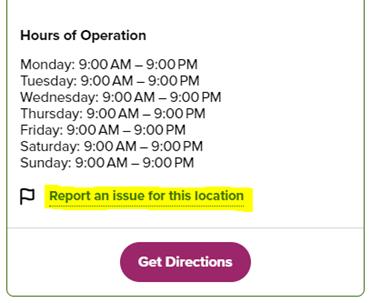
Note: In October 2026, the Where to Recycle map moved from rpra.ca to OntarioRecycles.ca, RPRA’s website to keep the public informed about the circular economy and recycling in Ontario.
-
Only your PRO can update collection site addresses. Ask your PRO to remove the old address from their collection network and add the new address.
The Compliance Team is unable to make changes to the address of a site that has been reported.
Note: In October 2026, the Where to Recycle map moved from rpra.ca to OntarioRecycles.ca, RPRA’s website to keep the public informed about the circular economy and recycling in Ontario.
-
Business hours are taken from Google Maps. If the information on Google Maps is incorrect, update your Google account information by following these steps. Note: there may be a delay between the time you update your information in Google and it showing on RPRA’s map.
If the information on Google Maps is correct and not showing on the Where to Recycle map, request to change it through the map directly by:
- looking up the location,
- clicking the location,
- clicking the ‘Report an issue for this location’ link, and
- filling out the form by providing the correct business hours.
Note: In October 2026, the Where to Recycle map moved from rpra.ca to OntarioRecycles.ca, RPRA’s website to keep the public informed about the circular economy and recycling in Ontario.
-
Phone numbers are taken from Google Maps. If the information on Google Maps is incorrect, update your Google account information by following these steps. Note: there may be a delay between the time you update your information in Google and it showing on RPRA’s map.
If the information on Google Maps is correct and not showing on the Where to Recycle map, request to change it through the map directly by:
- looking up the location,
- clicking the location,
- clicking the ‘Report an issue for this location’ link, and
- filling out the form by providing the correct phone number.
Note: In October 2026, the Where to Recycle map moved from rpra.ca to OntarioRecycles.ca, RPRA’s website to keep the public informed about the circular economy and recycling in Ontario.
-
Websites are taken from Google Maps. If the information on Google Maps is incorrect, update your Google account information by following these steps. Note: there may be a delay between the time you update your information in Google and it showing on RPRA’s map.
If the information on Google Maps is correct and not showing on the Where to Recycle map, request to change it through the map directly by:
- looking up the location,
- clicking the location,
- clicking the ‘Report an issue for this location’ link, and
- filling out the form by providing the correct website link.
Note: In October 2026, the Where to Recycle map moved from rpra.ca to OntarioRecycles.ca, RPRA’s website to keep the public informed about the circular economy and recycling in Ontario.
-
Wrong materials showing
If your site doesn’t collect the material(s) listed on the map, you can submit a request to change it through the map directly by:
- looking up the location,
- clicking the location,
- clicking the ‘Report an issue for this location’ link, and
- filling out the form by providing which materials should be removed.
Materials not showing
If you collect more materials than what is listed on the map, contact your PRO and they’ll update your collection site information.
If you aren’t already working with a PRO for a specific material and want to add a material to your collection site, you can find a list of PROs and contact information on the applicable program page of RPRA’s website.
Note: In October 2026, the Where to Recycle map moved from rpra.ca to OntarioRecycles.ca, RPRA’s website to keep the public informed about the circular economy and recycling in Ontario.
-
First, contact your PRO to confirm if the collection site should be considered private or if it can be removed entirely from their collection system. If they confirm it can be removed from the system, ask them to deactivate it so it no longer appears on the map.
If you aren’t working with a PRO, request to remove your collection site through the Where to Recycle map directly by:
- looking up the location,
- clicking the location,
- clicking the ‘Report an issue for this location’ link, and
- filling out the form asking to remove the collection site.
Note: In October 2026, the Where to Recycle map moved from rpra.ca to OntarioRecycles.ca, RPRA’s website to keep the public informed about the circular economy and recycling in Ontario.
-
A public collection site must be readily accessible to the public and accept designated used materials during regular business hours. Publicly accessible collection sites and events appear on the Where to Recycle map. Note: In October 2026, the Where to Recycle map moved from rpra.ca to OntarioRecycles.ca, RPRA’s website to keep the public informed about the circular economy and recycling in Ontario.
A private collection site (e.g. office or school that collects designated materials) does not need to be publicly accessible. Private collection sites do not appear on the map.
Read this related FAQ: What does it mean for a collection site to be readily accessible to the public?
-
To delete a duplicate collection site, submit a request through the Where to Recycle map directly by:
- looking up the location,
- clicking the location,
- clicking the ‘Report an issue for this location’ link, and
- filling out the form by asking to remove the duplicate collection site.
If the request is for multiple locations, contact the Compliance Team at [email protected] with the following information:
- the issue,
- name and address for each collection site, and
- your contact information.
Note: In October 2026, the Where to Recycle map moved from rpra.ca to OntarioRecycles.ca, RPRA’s website to keep the public informed about the circular economy and recycling in Ontario.
-
To update the type of collection site, submit a request through the Where to Recycle map directly by:
- looking up the location,
- clicking the location,
- clicking the ‘Report an issue for this location’ link, and
- filling out the form by providing the correct collection site type.
If the request is for multiple locations, contact the Compliance Team at [email protected] with the following information:
- the issue,
- name and address for each collection site, and
- your contact information.
Note: In October 2026, the Where to Recycle map moved from rpra.ca to OntarioRecycles.ca, RPRA’s website to keep the public informed about the circular economy and recycling in Ontario.
-
Readily accessible to the public means a site can be accessed by any consumer who wants to drop off used materials for free to be recycled, reused or refurbished.
A public collection site cannot restrict the type of products accepted. For example, an electronics collection site cannot refuse to accept printers or large televisions. Retail stores are only required to accept materials of a similar size and function to the products supplied at that location. For example, a mobile phone kiosk may choose to accept only mobile phones.
Collection sites can request reasonable requirements when consumers drop off an item to ensure health and safety. For example, sites may require that used oil filters are dropped off in sealed containers, light tubes are taped together, etc.
Publicly accessible collection sites and events will appear on the Where to Recycle map. Note: In October 2026, the Where to Recycle map moved from rpra.ca to OntarioRecycles.ca, RPRA’s website to keep the public informed about the circular economy and recycling in Ontario.
Restrictions
If a collection site has restrictions, for example due to an Environmental Compliance Approval (ECA), municipal by-law, or fire code provision, the restrictions may be applied, and the collection site will still be considered readily accessible to the public. For example, a municipal depot that has an ECA to accept materials only from residents of the community can apply this restriction and still be considered readily accessible to the public. Similarly, a collection site with an ECA that prohibits collection from the industrial, commercial and institutional sectors may apply these restrictions and still be considered readily accessible to the public. And a collection site that has restrictions on how it can be accessed (such as drive-in only) may enforce these restrictions and still be considered readily accessible to the public.
Read this related FAQ: What is the difference between a public and private collection site?
-
We recommend using Google Chrome, Mozilla Firefox, Microsoft Edge or Apple Safari when accessing the Registry. If you are experiencing an issue with the Registry, try clearing your cache or updating the browser to the latest version.
If you are using a different browser, the Registry will not function.
-
You should use the address where you carry on business. If you carry on business in more than one location in Ontario, use the main address for your business in Ontario. If you do not have an Ontario address, use the address that relates to the activities you carry out in Ontario.
-
To register as a PRO, contact the Compliance and Registry Team at [email protected] or call 647-496-0530 or toll-free 1-833-600-0530.
-
Resident in Ontario means a person having a permanent establishment in Ontario within the meaning of the Corporations Tax Act. A permanent establishment is usually a fixed place of business such as an office, factory, branch, warehouse, workshop, etc. In some cases, a corporation will be deemed to operate a permanent establishment in Ontario. These include cases where:
- The corporation produced, grew, mined, created, manufactured, fabricated, improved, packed, preserved or constructed anything in the province, in whole or in part;
- The corporation carries on business through an employee or agent in the province who has general authority to contract for the corporation; or
- The corporation carries on business through an employee or agent in the province who has a stock of merchandise owned by the corporation from which they regularly fill orders that they receive.
- A corporation will also have a permanent establishment in Ontario if it uses substantial machinery or equipment in the province, or if it is has a permanent establishment elsewhere in Canada and owns land in the province.
For more details about what constitutes a permanent establishment, see the definition of “permanent establishment” in the Corporations Tax Act.
-
RPRA is the regulator designated by law to oversee the operation and wind up of current waste diversion programs under the Waste Diversion Transition Act, 2016. The Authority provides oversight, compliance, and enforcement activities with respect to regulations made under the Resource Recovery and Circular Economy Act, 2016.
-
In accordance with the legislation (Resource Recovery Circular Economy Act 2016, section 57), RPRA is required to comply with strict confidentiality requirements. RPRA has also developed an Access and Privacy Code that applies to its day-to-day operations.
The Registry has been developed according to cybersecurity best practice principles. This includes VPN-based restrictions, staff training on all cybersecurity policies, staff access to the Registry on a strict role-requirement basis, and registry interface security features (example: two-factor authentication).
-
Under the Batteries, EEE, HSP, and Tire Regulations, a consumer is any end user of a product. A consumer includes an individual who obtains the product for the individual’s own use and a business that obtains the product for the business’s own use.
See our FAQ to understand “Who is a consumer under the Blue Box Regulation?”
-
RPRA takes a risk-based and proportional approach to compliance. This approach focuses on the potential risks that arise from non-compliance and assessing those risks to guide the use of compliance tools and the deployment of resources to minimize risk and maximize compliance. Learn more about RPRA’s Risk-Based Compliance Framework.
As a provincial regulator, we have the following powers to bring non-compliant parties into compliance:
- Broad inquiry powers including authority to compel documents and data
- Inspections and investigations
- Audits
- Compliance Orders and Administrative Penalty Orders (amounts to be set in regulation once finalized)
- Prosecution
RPRA’s primary approach to compliance is through communications (C4C – Communicating for Compliance). RPRA communicates directly with obligated parties and informs them of their requirements and when and how they must be completed. A high degree of compliance is achieved with this approach.
RPRA considers free riders a high priority to the programs we administer and focuses compliance efforts on bringing free riders into compliance with the regulations.
See our FAQ to understand “What is a free rider?”, and “What do I do if I think a business is a free rider?”
-
In the Manage PRO section in the Registry, the “Service End Date” is not a mandatory field. You can leave this field blank if there is no end date in your contract. If you decide to change PROs in the future, you can update this field to the date your agreement ended with that PRO.
-
The Manage PRO option will appear on the dashboard below your list of supply data reports when your supply data reporting is complete and if you have management requirements. If your supply data reporting is below the supply exemption threshold you will not have management requirements, and therefore not need to assign a PRO to assist with your obligations.
Also note that Account Admin are the only portal users that can manage your PRO’s responsibility, so this widget is not viewable to primary and secondary users.
-
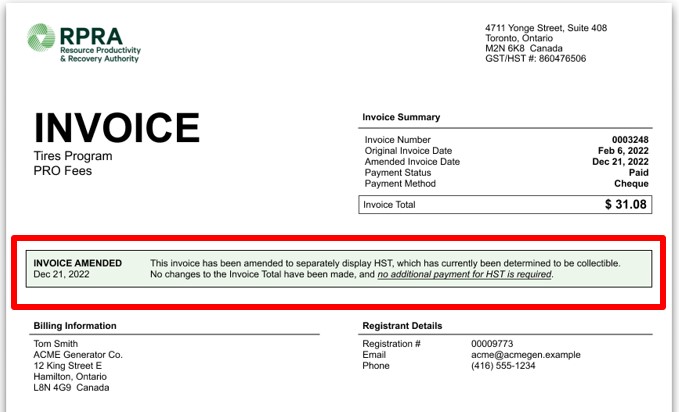
Registrants can access past invoices in their Registry account under a new tab labelled “Invoices”. A banner will be displayed that highlights whether an invoice has been amended to include HST as well as the date the amended invoice was reissued. This will show on all invoices with an invoice date before December 21, 2022. See sample screenshot below.
-
Registrants can access past invoices in their Registry account under the “Invoices & Payments” tab. From here, registrants can view, download and pay their invoices.
See sample screenshot below:

-
Failure of an obligated party to meet a registration or reporting deadline may result in compliance action, including compliance orders, prosecutions or monetary penalties issued in accordance with the Administrative Penalties Guidelines.
In accordance with the Risk Based Compliance Framework, RPRA will communicate to obligated parties, via email, about their reporting requirements in advance of submission deadlines. RPRA will also send deadline reminders and notify missed deadlines to obligated parties prior to taking further compliance action.
For more guidance, read the new Late Registration or Report Submissions Compliance Bulletin.
-
No. Effective February 6, 2023, RPRA will no longer accept requests for extensions to registration or reporting deadlines. Obligated parties should make every effort to ensure they meet all submission deadlines as part of their obligations under their associated regulation.
For more guidance, read the Late Registration or Report Submissions Compliance Bulletin.
-
Account admins can manage password resets for all active users in the account. Primary users are also able to manage password resets, but only for active users within the programs they are the primary user for. If secondary users require a password reset, they can reach out to the account admin or primary user to do so.
-
The account admin or primary user navigates to the program homepage of which the user requiring a password reset is enrolled in. The account admin or primary user then clicks their username at the top right of the page to show the drop-down list and selects Manage Users.
In the Active Users table, the account admin or primary user clicks Reset Password on the row for the user they want to reset the password for and clicks Confirm.
The user’s password has now been reset. They will receive an email with a password reset link.
Note: the password reset link will expire within 24 hours. If the link expires before the user creates a new password, the account admin or primary must click “Reset Password” again to restart the process.
See the FAQ: Who can reset passwords in the registry?
-
If you need to change an email address in your registry account, please contact the Compliance Team at [email protected]. Registry users cannot update email addresses themselves; this can only be completed by RPRA.
-
No. Recycling drop-off locations displayed on the map cannot:
- charge the public a fee to drop off materials that the location accepts.
- refuse the drop-off of materials displayed on the map. However, recycling locations can request reasonable requirements when consumers drop off an item to ensure health and safety. For example, sites may require that used oil filters are dropped off in sealed containers, light tubes are taped together, etc.
If you are charged a fee or refused drop off, you can report an issue about that specific location to RPRA (see our other FAQ for further instructions).
Note: In October 2026, the Where to Recycle map moved from rpra.ca to OntarioRecycles.ca, RPRA’s website to keep the public informed about the circular economy and recycling in Ontario.
-
Registrants may request that a Deputy Registrar review a Compliance Order issued to them by an inspector. The request must be made, in writing, by the registrant to a Deputy Registrar within seven days of being served with the order. The request must include:
- The parts of the order that the request for review pertains to;
- Any submissions the person requesting the review wants considered; and
- An address (physical or electronic) where the person can be served with the Deputy Registrar’s decision.
A Deputy Registrar will then review the order and can revoke, confirm, or amend the inspector’s order.
Deputy Registrars must either issue their decision or provide notice that more time is needed within seven days of receiving the request. If a Deputy Registrar provides notice that more time is needed, they must stay (put on hold) the order while it is under review, and the Deputy Registrar must issue their decision within 90 days.
If a Deputy Registrar does not issue a decision or provide notice that more time is needed within seven days of receiving the request for review, the order will remain as originally issued.
Note: This FAQ is for general information only and should not be considered legal advice. Please review the Resource Recovery and Circular Economy Act, 2016 and associated regulations for details.
See the FAQ: ‘Can I appeal a Compliance Order issued to me?’ for information on appealing a compliance order.
-
Registrants who receive a Notice of Intention to issue an Administrative Penalty Order may request that the Registrar or a Deputy Registrar consider additional information before they decide to issue the order. A registrant may ask the Registrar or a Deputy Registrar to review:
- Additional information related to the contravention;
- Any information relevant to the determination of the penalty amount; or
- Any actions you have taken to remedy the contravention since it occurred.
The request must be made to the Registrar or a Deputy Registrar, in writing, within 21 days of the notice of intention being served on the registrant. All additional information and supporting documentation that the registrant would like the Registrar or Deputy Registrar to consider should be included in the request.
The Registrar or Deputy Registrar must then consider the information in the request and determine whether or not to issue an order. If the Registrar or Deputy Registrar decides not to issue the order, they must notify the registrant of this decision.
See RPRA’s Administrative Penalties Guideline for further information or the FAQ: ‘Can I appeal an Administrative Penalty Order issued to me?’ for information on appealing an administrative penalty order.
Note: This FAQ is for general information only and should not be considered legal advice. Please review the Resource Recovery and Circular Economy Act, 2016 and associated regulations for details.
-
Registrants may appeal an Administrative Penalty Order issued to them to the Ontario Land Tribunal (OLT). The registrant must serve written notice of their intention to appeal to the OLT and to the Registrar or a Deputy Registrar within 15 days of being served the order. The order will be temporarily stayed (put on hold) until a decision is rendered by the tribunal. The notice must include:
- The parts of the order that the appeal pertains to; and
- The grounds on which the person appealing the order intends to rely at the hearing.
The OLT will hold a hearing, and the OLT may confirm, vary, or revoke the order. The OLT cannot vary the amount of the penalty unless it considers the amount to be unreasonable.
After a matter is decided by the OLT, the registrant or RPRA may appeal the OLT’s decision to the Divisional Court, but only on a question of law and with leave (permission) of the Divisional Court. If a party obtains leave, the appeal of the OLT decision will be heard by the Divisional Court. This process is governed by the Rules of Civil Procedure. The OLT’s decision is not automatically stayed by an appeal to the Divisional Court, but a stay may be granted by the OLT or the Court.
See RPRA’s Administrative Penalties Guideline for further information.
Note: This FAQ is for general information only and should not be considered legal advice. Please review the Resource Recovery and Circular Economy Act, 2016 and associated regulations for details.
-
If a Compliance Order is issued to a registrant by the Registrar or a Deputy Registrar, or if the registrant receives a decision from a Deputy Registrar issued as a result of a Request for Review of an inspector’s order, the registrant can appeal the order to the Ontario Land Tribunal (OLT). The registrant must serve written notice of their intention to appeal to the Registrar or Deputy Registrar who made the order and to the OLT within 15 days of being served with the order. The notice must include:
- The parts of the order that the appeal pertains to; and
- The grounds on which the person appealing the order intends to rely at the hearing.
The OLT will hold a hearing. The OLT may decide to confirm, vary, or revoke the order.
After a matter is decided by the OLT, the registrant or RPRA may appeal the OLT’s decision to the Divisional Court, but only on a question of law and with leave (permission) of the Divisional Court. If a party obtains leave, the appeal of the OLT decision will be heard by the Divisional Court. This process is governed by the Rules of Civil Procedure. The OLT’s decision is not automatically stayed (put on hold) by an appeal to the Divisional Court, but a stay may be granted by the OLT or the Court.
Note: This FAQ is for general information only and should not be considered legal advice. Please review the Resource Recovery and Circular Economy Act, 2016 and associated regulations for details.
-
Municipalities are required to accept materials from the sectors identified in their Environmental Compliance Approval (ECA). Municipalities are not required to accept more than what their ECA requires them to.
-
To request a refund for a payment made by credit card and direct debit, follow these steps:
- Log in to your registry account.
- Select the Program.
- Go to the Invoices & Payment tab.
- Scroll to the Invoices with Credit Balances table.
- Under Action click on Request Refund.
- Click on the green button showing the refund amount.
To request a refund for a payment made by a saved payment method (credit card or direct debit), follow these steps:
- Log in to your registry account.
- Select the Program.
- Go to the Invoices & Payment tab.
- Scroll to the Invoices with Credit Balances table Under Action click on Request Refund
- Check the box to Confirm your Attestation to the information.
- Click on the green button showing the refund amount.
To request a refund for a payment made by EDI, cheque or electronic bill payment, follow these steps:
- Log in to your registry account.
- Select the Program.
- Go to the Invoices & Payment tab.
- Scroll to the Invoices with Credit Balances table Under Action click on Request Refund
- Add your banking information as refunds will only be issued by EFT
- Check the box to Confirm your Attestation to the information.
- Click on the green button showing the refund amount.
Note: The Request Refund button is only available for invoices that have a negative balance.
If a registrant clicks the “Request Refund” button after a refund request has already been submitted, the registrant will see the following message: “A refund has already been requested for invoice 000XXXX on XX Date. We are currently processing your request.”
-
To pay multiple invoices at once, follow these steps:
- Log in to your registry account.
- Select the Program.
- On the program screen click Pay Now in the Total Unpaid Invoices box, located at the top right corner.
- Click the Pay Now button for saved payment methods or select Change Payment Method.
- Choose the payment method, then click Next.
- If the selected payment method is credit card or debit card, please enter your banking information or your credit card information, then click the Pay button.
- If the selected payment method is EDI, electronic bill payment, or cheque, please follow the payment instructions on-screen.
-
To view invoices with a credit balance by program, follow these steps:
- Log in to your registry account.
- Select the applicable Program.
- On the program screen go to the Invoices & Payment tab.
- Click on Outstanding Invoices tab.
- Scroll down to the Invoices with Credit Balances section to view invoices with credit balances.
-
Only account admins can designate an accounts payable (AP) user.
-
An accounts payable (AP) user is responsible for managing the financial aspects of a company’s registry account.
An AP user’s functionality includes:
- Accessing and paying invoices – View, download, and make payments for invoices.
- Managing saved payment methods – Add, update, or remove stored payment options.
- Modifying data across all programs – Modify program-related information as required for billing.
- Receiving billing and payment notifications – Receive email alerts about invoices, payments, and account balances.
- Communicating with RPRA regarding billing or payment questions – Act as the main contact for financial inquiries.
-
Yes, designating an AP User is required for account creation. This ensures financial responsibilities are clearly assigned.
-
Users must designate an accounts payable (AP) user during account set up.
To add an AP user during account set up, follow these steps:
- After adding the Business information and address, click Next.
- After entering the Account Admin information, scroll down.
- Enter the Account Payables User information.
- Check the box: ✅I hereby authorize this user to create/modify data. This confirms the AP User can modify data across all programs.
- Click Next
If you want to assign the account admin as the AP user, check the box labeled:
The Account Admin listed above is the Accounts Payable (AP) User.This will auto-fill the AP User section with the account admin’s information.
See FAQ: 7. What is an accounts payable (AP) user and what can they do in the registry?
-
Follow the steps below to add an AP user to an existing account:
- Log in to the Registry account.
- Go to the Manage Users
- Click on the Set Account Payable User
- Fill in the required details (e.g., name, contact info, etc.).
- Complete the Programs & User Access Levels section
- Check the box: ✅I hereby authorize this user to create/modify data. This confirms the AP user can modify data across all programs.
- Click Save
Note: The new AP user will receive an email invitation to create their password and gain access to the Registry account.
How to change an existing AP user:
- Log in to the Registry account.
- Navigate to the Manage Users
- Click on the Change Accounts Payable User button.
- To select an existing Registry user, type their name or email address in the search field
- Check the box: ✅ I hereby authorize this user to create/modify data. This confirms the AP User can modify data across all programs.
- Click
- To add a new user, click on “Add New User”
- Fill in the required details (e.g., name, contact info, etc.).
- Complete the “Programs & User Access Levels” section.
- Check the box: ✅✅ “I hereby authorize this user to create/modify data.” This confirms the AP user can modify data across all program.
- Click Save
-
RPRA invoices are due on receipt.
RPRA charges a monthly 1.5% late payment fee on outstanding invoices. Late payment fees accrue monthly until the original invoice is paid in full.
If a late payment fee is applied, registrants will receive an email notification, and a late payment fee invoice will be issued to their Registry account.
-
Information for consumers about environmental fees on products sold in Ontario can be found on Ontario Recycles.
Ontario Recycles was created by RPRA in 2026 to keep the public informed about the circular economy and recycling in Ontario.